
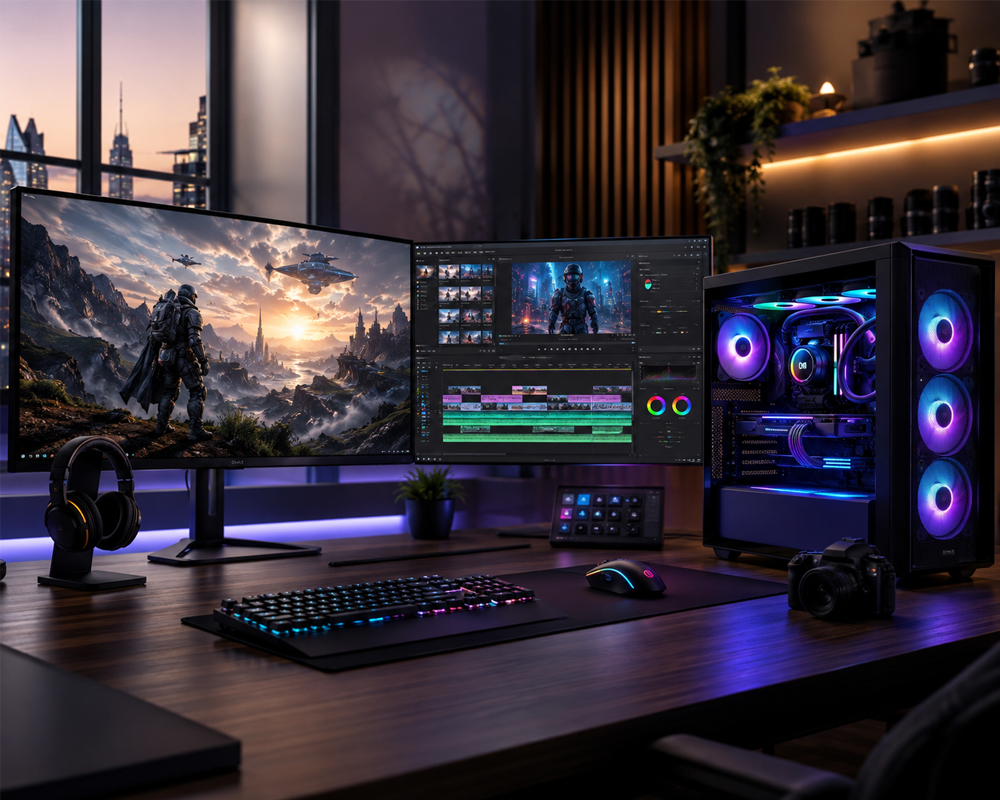
Building one computer for both gaming and video editing requires the right balance of processing power, graphics performance, memory, storage, cooling, and upgradeability.
A gaming-only computer may prioritize the graphics card and high frame rates, while a video editing workstation needs more CPU cores, additional RAM, fast storage, and dependable performance during long exports. A well-designed hybrid PC should handle both workloads without forcing you to compromise.
Whether you play competitive games, enjoy graphically demanding AAA titles, edit YouTube videos, create social media content, stream live gameplay, or work with professional 4K footage, this guide will help you choose the best PC build for gaming and video editing.
What Makes a PC Good for Gaming and Video Editing?
Gaming and video editing use hardware differently.
Games generally depend heavily on the graphics card and the processor’s single-core performance. Video editing programs also benefit from a powerful GPU, but they require strong multi-core CPU performance, sufficient RAM, and fast storage.
The best combined build should provide:
- A modern multi-core processor
- A powerful dedicated graphics card
- At least 32GB of DDR5 RAM
- Fast NVMe SSD storage
- Reliable cooling
- A high-quality power supply
- A motherboard with future upgrade options
Instead of purchasing the most expensive component in every category, focus on creating a balanced system. An extremely powerful graphics card paired with insufficient RAM, weak cooling, or slow storage can still produce an unsatisfactory experience.
Best Overall PC Build for Gaming and Video Editing
For most serious gamers, streamers, YouTubers, photographers, and video editors, the following configuration provides an excellent combination of performance and long-term value.
Recommended Specifications
- Processor: AMD Ryzen 9 9900X3D
- Graphics Card: NVIDIA GeForce RTX 5070 Ti 16GB
- Memory: 64GB DDR5 RAM
- Primary Storage: 2TB NVMe SSD
- Secondary Storage: 2TB to 4TB SSD or hard drive
- Motherboard: Quality B850 or X870 motherboard
- Cooling: Premium air cooler or 360mm liquid cooler
- Power Supply: 850W 80 Plus Gold-rated PSU
- Case: High-airflow mid-tower case
- Operating System: Windows 11
The AMD Ryzen 9 9900X3D offers 12 cores and 24 threads and is designed for gaming, streaming, content creation, and demanding desktop workloads. It also supports DDR5 memory and the AM5 platform, providing a strong foundation for a high-performance custom PC.
The RTX 5070 Ti includes 16GB of GDDR7 memory and supports NVIDIA Studio technologies, hardware encoding, ray tracing, and AI-enhanced gaming features. This makes it a strong option for high-refresh-rate 1440p gaming, selected 4K gaming workloads, video production, streaming, and GPU-accelerated creative applications.
Who Is This Build Best For?
This configuration is ideal for:
- High-refresh-rate 1440p gaming
- 4K gaming with optimized settings
- Adobe Premiere Pro
- DaVinci Resolve
- After Effects
- OBS streaming and recording
- YouTube and social media production
- Photography and graphic design
- Light-to-moderate 3D rendering
- Professional multitasking
The 64GB RAM capacity provides enough headroom for gaming, editing, browser tabs, creative software, background applications, and large project files.
Best Value Build for 1080p and 1440p Gaming
Not every user needs an enthusiast-level computer. A carefully selected mid-range build can provide excellent gaming performance while smoothly handling regular video editing.
Recommended Specifications
- Processor: AMD Ryzen 7 9700X
- Graphics Card: NVIDIA GeForce RTX 5060 Ti 16GB
- Memory: 32GB DDR5 RAM
- Storage: 1TB or 2TB NVMe SSD
- Motherboard: B650 or B850 motherboard
- Cooling: Quality tower air cooler
- Power Supply: 750W 80 Plus Gold-rated PSU
- Case: Airflow-focused mid-tower case
The 16GB version of the RTX 5060 Ti is particularly useful for users who want more graphics memory for high-resolution textures, editing timelines, effects, and creative applications. NVIDIA positions the RTX 5060 Ti for modern gaming and application workloads, with support for Blackwell architecture features and 16GB or 8GB memory configurations.
What Can This Build Handle?
This system is suitable for:
- Competitive 1080p gaming
- High-quality 1440p gaming
- YouTube video editing
- Short-form content creation
- 1080p and light 4K editing
- Live streaming
- Photoshop and Lightroom
- General productivity
For occasional editing and regular gaming, 32GB RAM is generally a sensible starting point. Users working with long 4K timelines, extensive effects, or multiple creative applications should consider upgrading to 64GB.
Ultimate 4K Gaming and Professional Editing Build
Users who want premium 4K gaming, demanding professional editing, heavy effects, 3D work, or advanced multitasking should consider a high-end configuration.
Recommended Specifications
- Processor: AMD Ryzen 9 9950X3D
- Graphics Card: NVIDIA GeForce RTX 5080 16GB
- Memory: 64GB or 128GB DDR5 RAM
- Primary Storage: 2TB high-performance NVMe SSD
- Project Storage: 4TB NVMe or SATA SSD
- Archive Storage: Additional high-capacity drive
- Motherboard: X870 or X870E motherboard
- Cooling: High-performance 360mm liquid cooler
- Power Supply: 1000W 80 Plus Gold-rated PSU
- Case: Premium full-size, high-airflow case
The Ryzen 9 9950X3D provides 16 cores and 32 threads, while the RTX 5080 includes 16GB of GDDR7 memory. Hextech Computer offers a configuration using this combination with DDR5 memory, NVMe storage, advanced cooling, Wi-Fi, Bluetooth, and support for gaming, streaming, video editing, rendering, and productivity workloads.
NVIDIA’s RTX 50 Series uses the Blackwell architecture and includes technologies for gamers and creators, including NVIDIA Studio support, ninth-generation NVENC encoding, ray tracing, and AI-assisted creative features.
Who Should Choose This Build?
This configuration is recommended for:
- Premium 4K gaming
- High-refresh-rate gaming
- Professional 4K and 8K video editing
- Complex DaVinci Resolve projects
- After Effects compositions
- Multicamera editing
- 3D rendering and animation
- AI-assisted creative applications
- Professional streaming
- Users who want strong long-term performance
Choosing the Right Processor
The processor affects gaming responsiveness, editing performance, rendering, encoding, multitasking, and system responsiveness.
For a combined gaming and editing build, consider:
- Eight-core processor: Suitable for gaming and regular content creation
- Twelve-core processor: Excellent balance for serious gaming, streaming, and editing
- Sixteen-core processor: Best for professional editing, rendering, and heavy multitasking
Processors with AMD 3D V-Cache technology are particularly attractive for users who prioritize gaming but still need strong creator performance.
Avoid choosing a processor based only on its maximum clock speed. Core count, architecture, software optimization, cooling, and the overall system configuration also affect real-world performance.
Choosing the Best Graphics Card
The graphics card is one of the most important components in a hybrid gaming and editing PC.
A modern NVIDIA GeForce RTX GPU can help with:
- Gaming frame rates
- Ray tracing
- AI-enhanced graphics
- Video playback
- Hardware encoding
- Video exports
- Creative effects
- Streaming
- 3D rendering
NVIDIA states that its RTX 50 Series can accelerate video editing in applications including Adobe Premiere and DaVinci Resolve through its latest NVENC hardware and creator-focused technologies.
For a new gaming and editing system, consider the following general levels:
- RTX 5060 Ti 16GB: Best-value option for 1080p, 1440p, and regular editing
- RTX 5070 Ti 16GB: Strong overall option for serious 1440p gaming and professional content creation
- RTX 5080 16GB: Premium choice for 4K gaming and demanding creative workloads
- RTX 5090: Specialist option for users with extremely demanding rendering, AI, or production requirements
Your choice should depend on your monitor resolution, editing software, project complexity, target frame rate, and budget.
How Much RAM Do You Need?
RAM directly affects multitasking and the ability to work with large editing projects.
32GB RAM
Suitable for:
- Gaming
- Streaming
- 1080p editing
- Regular 4K projects
- Photoshop
- General content creation
64GB RAM
Recommended for:
- Professional 4K editing
- After Effects
- Large Premiere Pro projects
- Multicamera timelines
- Heavy multitasking
- Gaming while streaming and recording
128GB RAM
Best for:
- 8K footage
- Complex visual effects
- Professional animation
- Large 3D scenes
- Extremely demanding production workflows
For most people building a premium gaming and editing PC, 64GB DDR5 provides the best balance.
Why Storage Speed Matters
Video files can be extremely large, and slow storage can create delays when opening projects, loading footage, generating previews, or transferring files.
A practical storage setup should include:
Primary NVMe SSD
Use a fast 1TB or 2TB NVMe SSD for:
- Windows
- Games
- Editing software
- Frequently used applications
Project SSD
Use a separate 2TB or 4TB SSD for:
- Active video projects
- Raw footage
- Cache files
- Preview files
- Exported videos
Archive Drive
Use a high-capacity SSD, hard drive, or external storage solution for completed projects and backups.
Keeping active project files separate from the operating system drive can make file management easier and prevent the main drive from becoming full.
Do Not Ignore Cooling and Airflow
Gaming, rendering, and video exporting can keep the processor and graphics card under heavy load for long periods.
Poor cooling may lead to:
- Higher temperatures
- Increased fan noise
- Reduced boost performance
- System instability
- Shorter component lifespan
Choose a case with a mesh front panel, sufficient intake and exhaust fans, proper cable management, and enough space around the graphics card.
For powerful Ryzen 9 builds, premium air cooling or a quality liquid cooler is recommended. Regular dust cleaning is also important, especially in environments where airborne dust can accumulate quickly.
Choose a Reliable Power Supply
A low-quality power supply can put the entire computer at risk.
Always choose a PSU from a reliable manufacturer with:
- Sufficient wattage
- 80 Plus Gold efficiency or better
- Modern GPU power connections
- Over-voltage protection
- Over-current protection
- Short-circuit protection
- A suitable manufacturer warranty
A 750W PSU may be sufficient for a balanced mid-range build, while higher-end configurations may require 850W or 1000W depending on the selected components.
Common PC-Building Mistakes to Avoid
When building a gaming and video editing PC, avoid these common mistakes:
Spending Everything on the GPU
A powerful graphics card cannot compensate for insufficient memory, a weak processor, poor cooling, or slow storage.
Installing Only 16GB RAM
While 16GB may run many games, it can become restrictive when editing video, streaming, recording, or using multiple applications.
Buying a Small SSD
Modern games, raw footage, project files, cache files, and exports can quickly fill a 500GB drive.
Choosing an Unreliable PSU
The power supply supports every component in the system. It should never be treated as an unimportant part.
Ignoring Future Upgrades
Choose a motherboard, case, cooling solution, and power supply that can support future RAM, storage, processor, and graphics-card upgrades.
Custom-Built PC or Preconfigured PC?
A custom-built PC gives you greater control over:
- Component quality
- Performance
- Cooling
- Appearance
- Storage capacity
- Upgradeability
- Budget allocation
It also allows the system to be designed specifically around your games, editing software, monitor resolution, project types, and future plans.
Hextech Computer provides custom-built gaming PCs, workstations, upgrade services, and premium computer components for gaming and professional requirements in the UAE.
Final Recommendation
For the best overall balance between gaming and video editing, choose:
- AMD Ryzen 9 9900X3D
- NVIDIA GeForce RTX 5070 Ti 16GB
- 64GB DDR5 RAM
- 2TB NVMe SSD
- Additional project storage
- 850W Gold-rated power supply
- High-quality cooling
- Airflow-focused case
This configuration offers the power required for demanding games, streaming, 4K editing, creative applications, and everyday multitasking without immediately moving into the highest enthusiast price category.
Users with lighter requirements can select a Ryzen 7 and RTX 5060 Ti 16GB system, while professional creators and premium 4K gamers can move up to a Ryzen 9 9950X3D and RTX 5080 configuration.
Build Your Gaming and Editing PC with Hextech Computer
Choosing compatible PC components can be challenging. The processor, graphics card, motherboard, RAM, storage, cooling, case, and power supply must all work together properly.
At Hextech Computer Trading L.L.C., we build high-performance custom gaming PCs and creator workstations based on your budget and requirements.
Whether you need a system for competitive gaming, 4K gaming, YouTube production, streaming, professional video editing, graphic design, rendering, or business use, our team can help you select a balanced and reliable configuration.
Contact Hextech Computer today and start building your ideal gaming and video editing PC in the UAE.
Frequently Asked Questions
Is a gaming PC good for video editing?
Yes. A gaming PC with a strong multi-core processor, dedicated graphics card, sufficient RAM, and fast SSD storage can also provide excellent video editing performance.
Is 32GB RAM enough for gaming and video editing?
32GB is suitable for gaming and regular video editing. Professional 4K editors, After Effects users, and heavy multitaskers should consider 64GB.
Which graphics card is best for gaming and editing?
The RTX 5060 Ti 16GB is a good value option, the RTX 5070 Ti 16GB provides a strong overall balance, and the RTX 5080 is suitable for demanding 4K gaming and professional creative workloads.
Should I choose 1TB or 2TB storage?
A 2TB NVMe SSD is generally the better choice for a combined gaming and editing computer because modern games and video project files require significant storage space.
Can one PC handle gaming, editing, and streaming?
Yes. A properly balanced PC with a modern Ryzen 7 or Ryzen 9 processor, an RTX graphics card, and at least 32GB RAM can handle gaming, streaming, recording, and editing.
Is a custom PC better for content creators?
A custom PC allows creators to select the exact amount of RAM, storage, cooling, processing power, and graphics performance required for their software and workflow.
Leave a comment